





































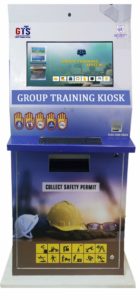
 Group Training System is conceptualized to allow industries accessing the easiest method to train N number of employees in one go. To ensure 100% adherence to SOP, Addsoft has designed Group Training System that ease the safety training method and digitized the safety pass technique.
BENEFITS OF GROUP TRAINING SYSTEM
User Friendly:
Through our group training kiosks, organizations can display various safety training videos over the wall of the kiosk. With our high-definition screen, picture clarity, and multi- lingual content facility, it’s considered highly user-friendly.
Workplace Safety:
Getting the employees trained who work in hazardous environments in companies, enhances their workplace safety.
Saving Money & Time:
Through our Group Training System many industries have helped themselves by spending a huge amount on hiring resources for providing training to their employees. Not only we have helped save money, but also we have helped save time by arranging training modules where a group of people can get trained at the same time.
Easy Content Customization:
We thrive on creating products that best fit our client’s needs. We support all the latest technology, hence we believe in customized kiosks. The content uploaded in our Group Training System is customized, and clients can update as well as change content as per their needs from time to time.
How Group Training System Operates
It has 2 major parts; Admin module & user module.
ADMIN:-
USER REGISTRATION
CONTENT CREATION-
- Admin can create/upload training videos and PPT or choose the training material from the existing training module.
- Admin can set Question & Answers
TRAINING SCHEDULING:
- Admin can configure participant list, date & time of briefing and evaluation of training
- Trainees will get notified through system generated massages or Email
USER-
BRIEFING & EVALUTION:
- On the scheduled date & Time Trainee Reports at the Training Center
- Trainee Log In to the App through Hand-held Answering Device
- Audio-Visual Briefing or PPT will run on the display screen
- Quiz will appear & the questions would shuffle after each exam if it’s set by the Admin
SAFETY PASS GENERATION:
- The administrator logs-in to the system from his terminal, generates various reports for analysis, Prints Safety Permit/ Safety Pass/Certificate.
- After Permit/ Certificate printing, the trainee can collect the same from the admin.
Group Training System is conceptualized to allow industries accessing the easiest method to train N number of employees in one go. To ensure 100% adherence to SOP, Addsoft has designed Group Training System that ease the safety training method and digitized the safety pass technique.
BENEFITS OF GROUP TRAINING SYSTEM
User Friendly:
Through our group training kiosks, organizations can display various safety training videos over the wall of the kiosk. With our high-definition screen, picture clarity, and multi- lingual content facility, it’s considered highly user-friendly.
Workplace Safety:
Getting the employees trained who work in hazardous environments in companies, enhances their workplace safety.
Saving Money & Time:
Through our Group Training System many industries have helped themselves by spending a huge amount on hiring resources for providing training to their employees. Not only we have helped save money, but also we have helped save time by arranging training modules where a group of people can get trained at the same time.
Easy Content Customization:
We thrive on creating products that best fit our client’s needs. We support all the latest technology, hence we believe in customized kiosks. The content uploaded in our Group Training System is customized, and clients can update as well as change content as per their needs from time to time.
How Group Training System Operates
It has 2 major parts; Admin module & user module.
ADMIN:-
USER REGISTRATION
CONTENT CREATION-
- Admin can create/upload training videos and PPT or choose the training material from the existing training module.
- Admin can set Question & Answers
TRAINING SCHEDULING:
- Admin can configure participant list, date & time of briefing and evaluation of training
- Trainees will get notified through system generated massages or Email
USER-
BRIEFING & EVALUTION:
- On the scheduled date & Time Trainee Reports at the Training Center
- Trainee Log In to the App through Hand-held Answering Device
- Audio-Visual Briefing or PPT will run on the display screen
- Quiz will appear & the questions would shuffle after each exam if it’s set by the Admin
SAFETY PASS GENERATION:
- The administrator logs-in to the system from his terminal, generates various reports for analysis, Prints Safety Permit/ Safety Pass/Certificate.
- After Permit/ Certificate printing, the trainee can collect the same from the admin.